Where to Run the TetherBox Software
https://my.timeline.is/help/tetherboxes/where-to-run-tetherbox-software
Last updated: August 08, 2026
Table of Contents

Where to Run the TetherBox Software

The TetherBox bridge software connects the equipment at a site to the TetherX platform. You can install it next to that equipment, on the same network, or centrally, reaching the equipment across a link: the site network, a wireless link, or a WAN to another location entirely.

This article calls those two models on-site deployment and central deployment. The model determines how much traffic crosses the link, whether recording continues during an outage, which devices you can manage remotely, and whether any device has to be exposed to the Internet.

We support either model. One site can run several TetherBoxes, one TetherBox can serve several sites, and you can combine both across an estate.

Requirement Preferred model
Recording must continue when the link drops On-site
Serial, Modbus or dry-contact equipment to integrate On-site
Device discovery and tunnelling across each network segment On-site
Cameras on wireless links, or a building too large for one network On-site, one per area
A metered, capped or cellular connection On-site
No suitable location or power for a unit near the equipment Central
A private, resilient link already in place Either, central is suitable
Minimal infrastructure at the site, with capacity to spare on the link Central

On-Site Deployment

For most sites, install the bridge software on the same network as the equipment it manages. Recording then stays local, and fewer network paths sit between the TetherBox and the cameras, panels and controllers it talks to.

What the TetherBox connects to

Equipment Connects by What that requires
Cameras, video recorders, access control panels, intercoms IP, each with its own protocols and management interface A TetherBox on the same network
Alarm panels, BMS, matrix displays, flood sensors Serial, Modbus or dry contact A TetherBox or gateway installed locally, with a compatible hardware interface

Where to install it

Put the TetherBox on the segment its equipment sits on:

  • The communications cabinet.
  • The alarm enclosure.
  • A roadside cabinet or a lamp post.
  • One TetherBox per network segment in a larger installation.

That placement also keeps the equipment isolated. Many devices no longer receive firmware updates, and others depend on regular firmware maintenance throughout their service life, so they are better kept off the Internet and away from unrelated corporate network segments.

What to run it on

The bridge software runs on Linux, x86 or ARM, whether that is a TetherBox appliance we supply ready to install or hardware you already have:

  • On Linux, directly. A Raspberry Pi (guidance), a fanless PC, a server or a desktop that stays powered on all qualify. See Installing Operating System. For volume rollouts we supply tooling that writes bootable SSDs in bulk, so a drive goes straight into compatible hardware and runs as an appliance: ask us for it.
  • On Windows, in a virtual machine. The same Linux appliance runs inside VirtualBox on a machine the site already has. See Running TetherBox in VirtualBox.

Either way the host must meet the processing, storage and network requirements for the connected cameras. See Hardware Specifications for the full picture, CPU Recommendations for camera counts, TetherBox Recording Capacity for retention and Storage Hardware Recommendations for drives.

Warning: Poles, roadside cabinets and unconditioned plant rooms expose hardware to wider temperature ranges, moisture, dust, vibration and unreliable power. Specify hardware rated for that environment, with stable power, adequate cooling, storage rated for continuous writes, and a lockable enclosure to keep the unit out of reach.


Real World Examples

A central TetherBox usually serves a single site: one unit for a whole large building, or one unit reached by cameras on wireless links. Both examples below started that way, and both later moved to several TetherBoxes closer to the equipment.

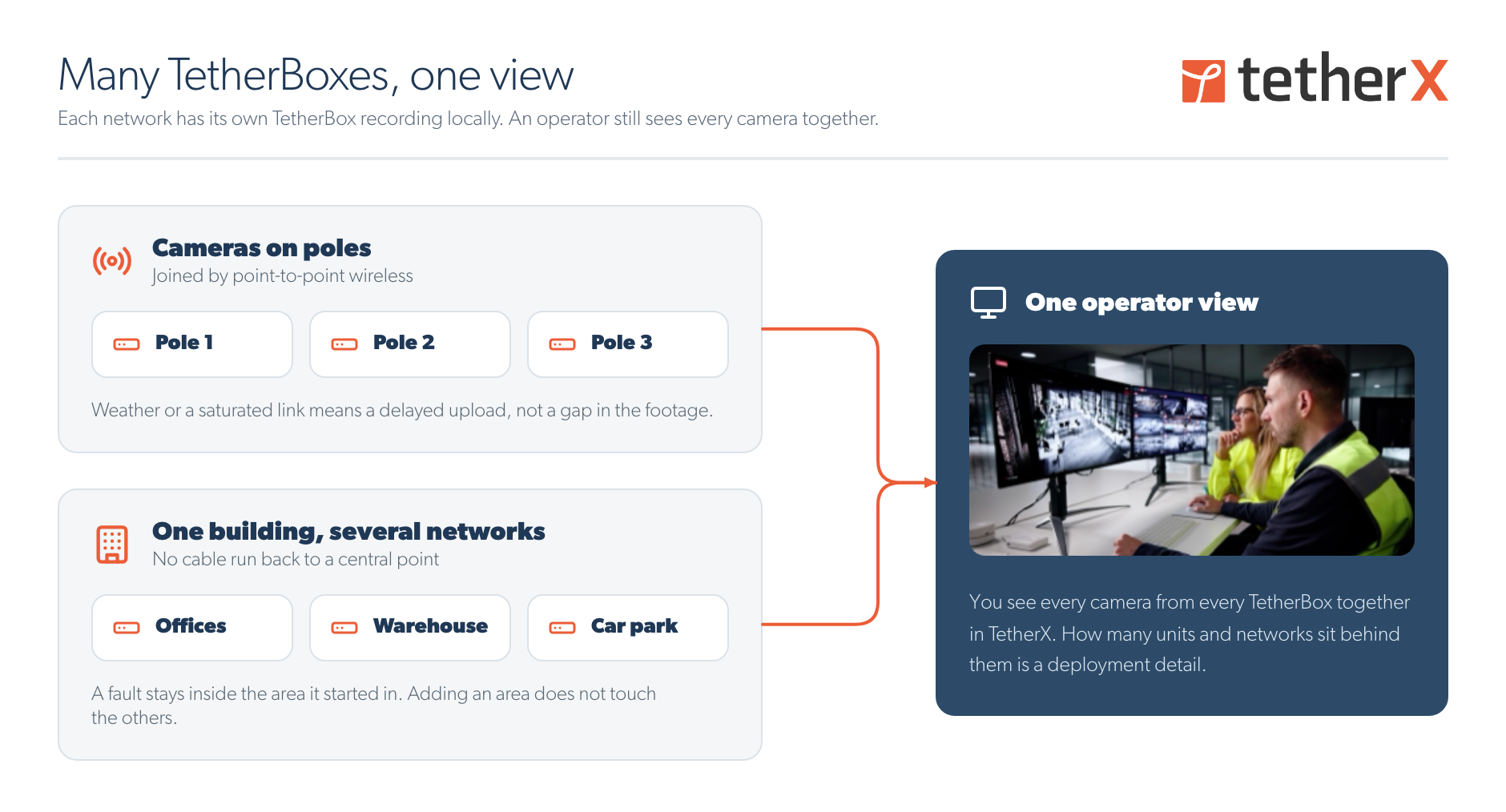
Several TetherBoxes across poles and building networks, all feeding one operator view

Cameras on lighting poles

  • Initial configuration: every video stream crossed a point-to-point wireless link to reach a single central TetherBox at the far end.
  • Problem: heavy weather, radio firmware faults and link saturation interrupted recording repeatedly, and each interruption left a permanent gap in the archive.
  • Resolution: the installer deployed a Raspberry Pi TetherBox at each pole.
  • Result: each unit records locally and uploads once the link returns, so a link outage delays synchronisation without causing a gap in the local recording.

An academy with one central TetherBox

  • Initial configuration: every camera in the building recorded across the core network to one central TetherBox in the main comms room.
  • Problem: during busy periods that recording traffic saturated the 2.5 Gbps core, leaving gaps in the archive at exactly the times footage is most likely to be needed.
  • Resolution: the integrator divided the building into several recording networks, with one TetherBox serving each area.
  • Result: recording traffic stays inside each area, and the core carries live viewing and the footage kept centrally rather than every recording stream.

In both cases an operator opens Live View and sees every camera together. The number and location of the underlying TetherBoxes and networks do not change the operator workflow.


Central Deployment

A central deployment runs the same bridge software away from the equipment it manages, reaching it across a link rather than over its local network. That covers two quite different scopes:

  • One unit for a whole site, with the cameras reaching it across the site network or over wireless links. This is the common case, and both examples above began this way.
  • One unit for several sites, hosted in a data centre or head office and reaching each site across a WAN. This is what a cloud-only architecture means. We support it and some estates run it, but it is rare in practice.

The distances differ; the consequences below do not.

The cameras generate the same traffic wherever the bridge software runs. What changes is the path that traffic takes, and what happens when it cannot get through:

  • Recording stops while the link is unavailable. Footage from that period cannot be recovered.
  • Every configured recording stream crosses that link continuously, around the clock, not only when an event triggers.
  • Each managed device must be reachable from the central TetherBox.

Suitable connectivity for that last point includes:

  • A site-to-site VPN.
  • MPLS or another private WAN.
  • SD-WAN.
  • A campus or council fibre network.
  • Point-to-point wireless.
  • A private APN.

Without a private connection, each device must be reachable through public addressing, NAT or port forwarding. We do not recommend that configuration for the reasons described in Network Access and Internet Exposure.

Prerequisites for a central deployment

Before deploying centrally, verify that:

  • The host can route to every managed device it is expected to manage, with no overlapping IP ranges anywhere in the path.
  • The link provides sustained capacity from the equipment to the host for the aggregate configured camera bitrate (bitrate figures).
  • The link is unmetered, or its data allowance covers that bitrate running continuously. Cellular and satellite connections rarely qualify.
  • Latency, jitter and packet loss suit the configured video streams and the device protocols in use.
  • Firewall rules permit every protocol the managed devices need.
  • The host and its storage cover the total recording and retention requirement of every site it serves, with headroom for the cameras still to be added.
  • Losing recording during a link outage is acceptable to the end customer.

Comparison

The bridge software on site, against reaching the equipment over the Internet

Characteristic On-site deployment Central deployment
Recording location On site Central host
Recording during a link outage Continues, uploads afterwards Stops, footage is lost
Recording traffic across the link Live viewing and selected footage Every recording stream, continuously
Inbound firewall rule or port forwarding Not required Depends on the network design
Direct Internet exposure of devices Not required Required without a private link
Local serial, Modbus and dry-contact equipment Supported with a compatible interface Needs a local gateway
Device discovery The local network segment Devices the central host can route to
Remote firmware management Devices reachable from the TetherBox Devices already routable centrally
TetherBox live view and playback over the site LAN Available Not available
NTP source for cameras Available Not available
Automations during a link outage Locally executed automations continue Site-dependent automations stop until the link returns
Hardware per site or segment Usually required Not required
Dependence on link availability Lower Higher

The next four sections cover the characteristics that most often decide the model.


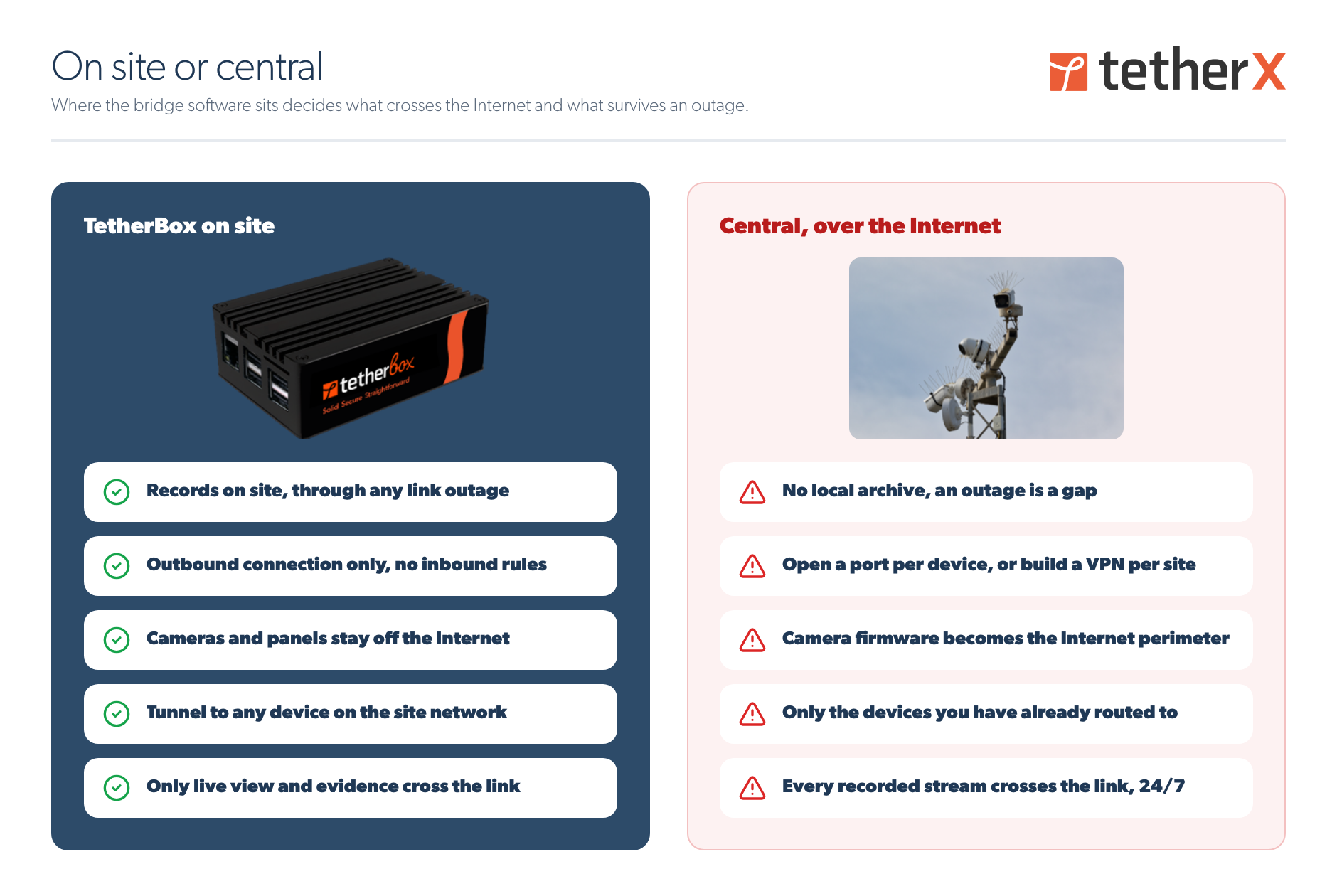
For a central TetherBox, any failure that interrupts connectivity to the equipment stops recording: a wireless link dropping in heavy weather, a switch or router failure, a WAN circuit failure, an ISP outage, or the loss of a site-to-site tunnel. Footage from that period cannot be recovered.

An on-site TetherBox keeps recording through all of those, and uploads the buffered footage once the link returns, so the archive has no gap.

Warning: An on-site TetherBox protects against loss of the link to the platform. It does not protect against failures at the site itself, including local power (power recovery), the local network, the cameras or the TetherBox storage (drive replacement).


Bandwidth and Storage

  • On-site deployment: only live viewing, event traffic and footage selected for central retention leave the local network. The archive stays on site, so the site needs local storage for the configured retention period. Sizing: TetherBox Recording Capacity.
  • Central deployment: every recording stream crosses the link continuously, whether or not the footage is ever viewed, so capacity is needed at both ends. Where that link is a wireless hop or a building backbone, this is the traffic that saturates it. The host must also hold the aggregate retention for everything it serves, sized per Hardware Specifications.

Size the link from the aggregate configured camera bitrate, not from average Internet usage at the site. TetherBox Recording Capacity has the per-camera figures, and Cloud Backup Setup covers what is worth keeping centrally.

Work out the monthly volume before choosing a central deployment. Eight cameras at 4 Mbps each is 32 Mbps sustained, which is 345 GB a day and roughly 10 TB a month, every month, whether anyone watches the footage or not. The same site recording locally sends only live viewing, event traffic and the footage you choose to keep.

That volume rules out most metered links. A site on 4G, 5G or satellite is rarely a candidate for central recording: data allowances, fair-use throttling and per-gigabyte charges all apply to traffic running around the clock, and an uplink shared with the customer will not carry every camera stream at once.


Network Access and Internet Exposure

  • On-site deployment: the TetherBox establishes outbound connections to the TetherX platform, so no inbound firewall rule or port forwarding is required, and the managed devices do not need to be reachable from the Internet. Encryption is covered in TetherBox, ports in Connecting your TetherBox to the Internet.
  • Central deployment over a private link: the devices stay off the Internet, but you or the customer's IT design and maintain the link, its addressing and any tunnels.
  • Central deployment over the Internet: each managed device has to be published through public addressing, NAT or port forwarding, which makes it part of the Internet-facing attack surface. Its security then depends on the device firmware, its authentication controls, its configuration and continued patch availability.

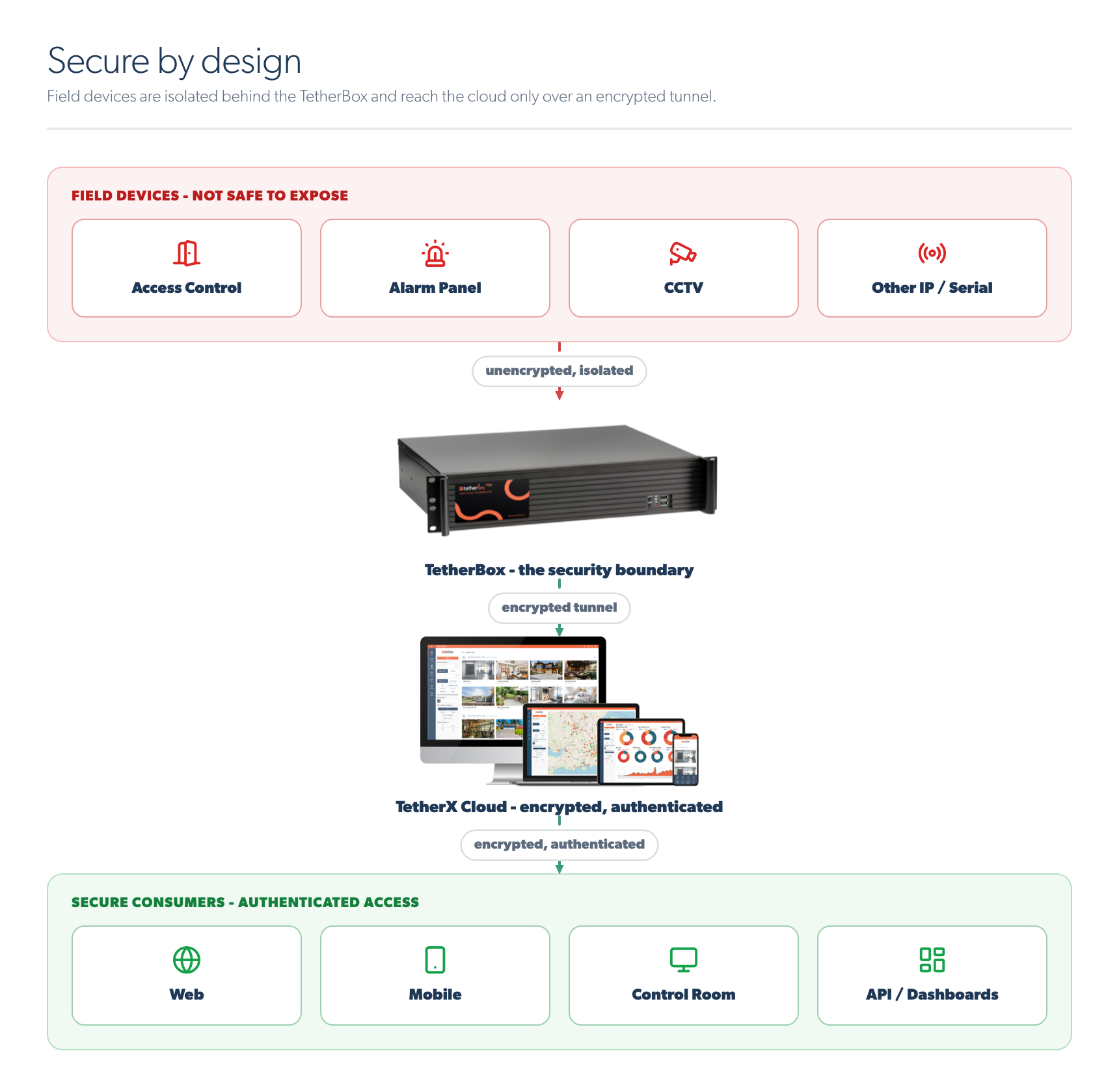
Field devices isolated behind the TetherBox, reaching the cloud over an encrypted tunnel

Warning: Cameras, recorders, intercoms and alarm panels are not intended for direct exposure to the public Internet. Some ship with default credentials, some run outdated services, and many stop receiving security updates long before the end of their working life. Use a private network, a VPN or TetherBox-mediated access instead of port forwarding.

We maintain TetherBox units centrally instead: supported units receive over-the-air software and security updates throughout their supported service life. See TetherBox Firmware Updates.


Remote Device Management

  • On-site deployment: you can tunnel to devices the TetherBox can reach on the local network, reconfigure cameras, update firmware and reach other authorised network equipment, subject to access controls. Device detection identifies new and missing devices on those segments, so a camera that is unplugged or stolen shows up in the Health Report rather than when somebody asks for the footage.
  • Central deployment: the same tools work, but only for devices already routable from the central host. Devices that are not routable require a separate remote-access path or an on-site visit.

When to Use a Central Deployment

A central deployment is suitable where the link and the site architecture meet the necessary availability, bandwidth and security requirements. In practice that means:

  • The sites are joined by a link you control end to end, such as an MPLS circuit, a council fibre network or a campus backbone, so no device is reached over the public Internet.
  • There is nowhere at the equipment location to install a unit, or no power for one, as with pole-mounted cameras on a fibre run.
  • The deployment is temporary and the network is already in place.
  • The link is unmetered and has capacity to spare, rather than cellular or capped.
  • The camera count is small and the retention requirement is short.

A central deployment reduces the number of TetherBox hosts to install and maintain. In return, recording depends on the link staying up, all recording traffic crosses that link, and remote management covers only the devices the host can route to.

You can combine both models, and every unit appears in the same platform. Where you deployed centrally because there was nowhere to install a unit on site, you can add one later without changing anything an operator sees.


Last updated: August 08, 2026