

Table of Contents
Patriot Systems Reference
The detail behind Patriot Systems Integration: the one-off job your control room's Patriot administrator does, what Patriot's own interface allows and refuses, what is coming, and what to check when alarms are not arriving.
Setting a site up does not need anything on this page. Start with Patriot Systems Integration and come back here when you need it.
The Same Thing, Two Names
TetherX and Patriot describe the same job in different words, and a conversation with a control room goes wrong quickly when each side assumes the other's meaning. This is the translation, and it is worth reading before the first call.
The word that causes the most trouble is zone. A Patriot zone is one detection point on an account, which is what TetherX calls a camera. TetherX has no word for a group of sites, and Patriot's area is part of a client number rather than a place.
| Patriot calls it | TetherX calls it | What it is |
|---|---|---|
| Bureau, or dealer | Integrator, or distributor | The company whose customers the control room monitors. Patriot uses both words for the same thing |
| Client, or account | Site | One monitored premises. A TetherX site maps to exactly one Patriot client |
| Client number | The site's Patriot client number | The account number an operator sees, including the area and port, for example 0013BASE01 |
| Client reference | The site's Patriot client reference | Patriot's own numeric id for the same account. Needed to read anything back, and not visible in a signal |
| Zone, or zone user | Camera | One detection point on the account. TetherX sends each camera as its own zone number, so the operator sees which camera fired |
| Signal | A detection being sent | One alarm handed to Patriot. It is what TetherX sends, not what the operator works |
| Activation | Event | The alarm on the operator's screen, raised by Patriot from a signal. Several TetherX detections on one event send at most one signal each, and Patriot groups them into one activation |
| Ticket number | The Patriot ticket on the event's Control Room panel | The activation's own reference, which both sides can quote |
| Event type, or type number | Trigger, and the event name it resolves to | What kind of alarm it is. TetherX uses 9001 to 9049, listed above |
| Operator note | Comment | A line written against the alarm. A TetherX comment is sent to Patriot as an operator note; a staff note is internal to TetherX and is never sent |
| Take ownership | Send to pending, or opening the operator console | An operator claiming the alarm. Releasing it is the same word on both sides |
| Sleep | Soft close | Setting the alarm aside until a time, to be woken if it carries on |
| Complete | Close | Finishing the alarm |
| Activation reason | No equivalent | Why an alarm was finished, chosen from the control room's own list. TetherX has nothing that maps onto it, so a close sent from TetherX carries no reason. Setting one is a separate step at Patriot, not part of the close |
| Test mode | Maintenance window | Holding the account off watch for planned work. Signals still arrive and are still recorded, they simply do not raise activations |
| Security group, and security rights | Permissions | What the TetherX user in Patriot is allowed to do. Rights are granted to the group, not to the user |
| ICA, or Internet Client Access | The Patriot address on the site or control room account | The host Patriot serves its interface from, for example https://ica.example.com |
| Action plan | No equivalent | The procedure the control room's operator follows for a type of alarm. It belongs to the control room and TetherX neither sets it nor reads it |
| Watchdog account | The watchdog account on the control room account | The Patriot account the connection heartbeat is sent to |
Loading the TetherX Event Types into Patriot
TetherX logs every alarm under its own event type number, from 9001 to 9049. Patriot accepts any number and answers the same way whether it knows it or not, so nothing fails: the difference is only visible on the operator's screen. A number Patriot holds arrives with the event type's description in front of ours. A number it does not hold arrives with no description and no action plan at all.
This section is for the Patriot administrator at the control room. It is two jobs, and only the first is a one-off:
| Job | How often |
|---|---|
| Importing the template, which creates the TetherX event types in Patriot | Once per Patriot system. Not per customer and not per site. The types are held once and every account points at them |
| Ticking Use Template on an account | Once per monitored account, so each new site the control room takes on |
So a control room imports the file the first time it monitors a TetherX site, and after that adding a customer is only the second step.
The Files
| File | What it is for |
|---|---|
| TetherX event types, Patriot XML template | Loaded through Maintenance > Clients > Merge Data. Creates a template client called TetherX Event Types holding all 49 types |
| TetherX event types, CSV | Opens in Excel. Use it to check the numbers against your existing templates, or to type the types in by hand |
The CSV carries the type number, the TetherX event name, the description an operator should see, what the event means, and a suggested action plan and priority for each one. The action plans are suggestions using Patriot's standard plan names, so your own plans and priorities take precedence.
Warning: The XML file is built to the same format as the templates Patriot publishes, but it has not been loaded into a live Patriot installation by TetherX. Patriot's own guidance is to test an import in a non-production environment first, and to contact Patriot Support if you want a hand with it. If you would rather not import anything, the CSV and the Event Types tab do the same job by hand.
Where Event Types Live in Patriot
Event types belong to a client, on the client's Event Types tab. Open a client from Maintenance > Clients, select the Event Types tab, and the list of type numbers and their descriptions is on the left, with Insert, Edit, Delete and Copy From buttons.
Templates are clients too. They are managed at Maintenance > Clients > Templates, and a template that carries event types has the (Event) Type category ticked on its Template Types tab.
Patriot documents both screens in its own library:
- Event Types (opens in a new tab) - the tab, the fields and the Template Selector
- Template Maintenance (opens in a new tab) - creating templates and template chaining
- Import Templates (opens in a new tab) - the Merge Data screen
A Template, Not the Client
Types can be entered straight onto a single client, or held once on a template that many clients point at. Use a template for anything beyond a single site. Patriot's own reasons are that a change to the template reaches every client using it at once, whereas types copied onto each client have to be changed one by one, and that the template is held once in the database rather than per client.
Types entered on a client are also local to it, so a second site monitored for the same customer gets none of them.
Importing the Template
- Download the XML file above.
- Go to Maintenance > Clients > Merge Data and select the file. Patriot reads it and lists the action plans it refers to.
- Match each action plan to one on your system using the selector beside it, or create a new one. The file refers to nine plans, all of them names Patriot's own standard templates use:
General Alarm,System Alarm,System Alert,Low Battery,Restoral, No Alarm,Zone Info, No Alarm,Closing (Set), No Alarm,Opening (Unset), No AlarmandTest Report. - Choose the merge behaviour. Skip Existing is the safe choice on a first import, because it leaves anything already in your database untouched.
- Click Save. Patriot writes a log of the import beside the file it read.
The imported template is a client numbered TETX000101, named TetherX Event Types. Rename or renumber it afterwards to suit your own conventions.
It refers on to the System Generated template (SYST000101) so that clients using it still receive Patriot's own 65000 and above system events. That is Patriot's own recommendation for every event type template. Check the reference on the template's Event Types tab after the import and point it at your System Generated template if yours is numbered differently.
Selecting the Template on an Account
Each account that TetherX reports to has to be told to use the template.
- Open the client from Maintenance > Clients.
- Select the Event Types tab, and find the Signal Interpretation area.
- Tick Use Template, then click the Template Selector to open the Template PopUp.
- Find TetherX Event Types and double click it. Its number then shows in the Template Selector, and the types appear in the list with the template indicator icon on the left. Hovering over that icon names the template each type came from.
- Save the client.
If a template already covers the account, chain rather than replace: a template can refer to another template, up to three deep, and a type in the first template overrides the same number in the one it refers to.
Numbers Already in Use Win, So Check 9001 to 9049 First
Types entered at client level override the same number coming from a template, and a template overrides the templates it refers to. So an entry that already exists at one of our numbers is what the operator sees, and ours is never reached.
This is not hypothetical. Testing against a development account on 18 September 2026, a TetherX perimeter alert and a person detection arrived on the operator's screen as fire signals, because the account's own types already held those two numbers:
| TetherX sends | Meaning in TetherX | What the operator saw |
|---|---|---|
| 9026 | Perimeter Alert | FB-Fire bypass |
| 9027 | Person Detected | FC - Fire Cancel |
Warning: A number already in use turns a video alarm into whatever that number already means, and a fire signal raised by a camera event sends an operator down the wrong procedure. Check 9001 to 9049 across every template an account chains to, and on the accounts themselves, before the first site goes live.
Where a number is taken, either remove the entry holding it or tell TetherX, and the TetherX range is moved instead. Patriot allows any number from 0 to 65535 and reserves above 65000 for its own internally generated signals, so 9001 to 9049 stays clear of Patriot's own range whichever way this goes.
Tip: Types that need no operator action, such as the arming, restore and status types in the list, should be given an action plan with priority 0. Patriot alarms on any signal type it has not seen before, so an unconfigured number creates an activation for the operator to clear.
Checking It Worked
Ask TetherX to send a test alarm, or generate a detection on a camera at the site, then open the signal in Patriot.
- A configured number reads with its event type description first, then the TetherX description, for example
Person Detected Person detected on Camera 3. - An unconfigured number reads with the TetherX description alone, and carries no action plan.
If the description is missing, the account is not reaching the template: check that Use Template is ticked on that client and that the Template Selector names the TetherX template.
What TetherX Can and Cannot Send to Patriot
Patriot's interface decides what can cross between the two systems. Everything below is based on Patriot's published API, so it applies to any Patriot control room, not only IMS.
Sent today
| What | How it reaches the operator |
|---|---|
| Alarms from AI detections, camera analytics and VMD | A signal against the site's client number, with the camera as the zone number and the event type as the Patriot type number |
| The verification image | Carried inside the alarm, so it opens in the operator's activation |
| Camera and device communication failures | The same way, as their own event types |
| The site's position | Sent with every alarm and shown on the account's Map tab |
| A heartbeat | Every minute from the control room account, as an ordinary signal to the account nominated for it |
| Arming and disarming | As their own signals, because Patriot has no arm or disarm command and a signal is the only way it records the state |
The heartbeat signal
Patriot has no heartbeat of its own. What TetherX sends is an ordinary signal, once a minute, to whichever account the control room nominates, and the control room treats a gap in it the way it treats a quiet alarm receiver line.
| Field | Value |
|---|---|
| Type | 602 |
| Zone | 1 |
| Description | API Heartbeat Signal |
| Client number | The Watchdog Account on the control room account |
Warning: Type 602 is outside the 9001 to 9049 range the TetherX template covers, so it has to exist in the nominated account's event types as well, with an action plan at priority 0. An account that does not hold 602 raises an activation for an operator to clear once a minute, because Patriot alarms on any type it has not seen before.
Switch the heartbeat off on the control room account if your control room does not watch for one.
Built, and waiting on your control room
These are in TetherX and switched on per site, but the TetherX user in Patriot has to hold the right before the control room will answer. The message TetherX shows you names the right Patriot asked for.
| What | What it does | What it needs |
|---|---|---|
| Camera names | Writes each camera's name into the matching Patriot zone, so the operator reads "Loading Bay" rather than a number, without anybody retyping the list | Permission to edit the account's zones |
| Maintenance windows | Puts the site on test at the control room for up to 24 hours with a reason, so planned work does not become operator call-outs. Alarms still reach Patriot and are still recorded, so the history is kept. The card is on the site's Patriot Systems tab | Permission to set test mode |
| Operator actions | Taking an alarm, commenting on it, snoozing it, firing a deterrent or closing it in TetherX is written onto the control room's screen | Permission to read and work alarms |
| What the operator did | The event shows who took the alarm, how long they took and how they completed it | The same permission |
Each of these reports the control room's own words when it is refused, and those words name the right Patriot wanted. Hand that sentence to your control room rather than describing it: it is what their Patriot administrator needs to grant the right.
Operator actions, and the honest limits
An operator working an alarm in TetherX can close it, record what action was taken, add a note, flag the footage, share it, escalate it and generate a report. Patriot's API allows some of that to be reflected in the control room, and refuses the rest.
| Action in TetherX | Can it reach Patriot? | How |
|---|---|---|
| Action Taken ticks | Yes | Observed, No Action Taken; Report Sent; Emergency Dispatched; and Emergency Arrived are sent as operator notes. Clearing a tick sends a note too |
| Adding a note | Yes | A TetherX comment is written against the alarm the operator is working, prefixed with TetherX and the name of whoever wrote it, and carrying a link back to the event |
| Closing an event | Yes | The alarm is completed, and a note beside it says who closed the event and what they are: a site user, the site's own administrator, a TetherX monitoring operator, TetherX staff, the installer or the distributor. Patriot records its own API user against the completion itself, so the note is the only place the person can be named. Patriot answers with anything its own rules still require, such as a reason or a contact that was not checked |
| Closing itself after a snooze | Yes | A snoozed event that sees no further activity closes on its own, and that close reaches the control room too, saying the timer finished it and who had snoozed it |
| Choosing why it was closed | Not yet | Patriot takes a completion reason from a list your control room keeps in Patriot itself. The list is theirs: nothing in the API creates or renames a reason, and there is one list per control room rather than one per account, so the same reason has different numbers at different control rooms. TetherX can read the list, and can set a reason, where the rights are granted. What is missing is the meaning, since nothing in a TetherX close says which of their reasons an operator meant. Ask your control room which of their reasons a TetherX close should use, and we can map onto it |
| Snoozing or deferring | Yes | A soft close puts the alarm to sleep at the control room until the moment TetherX will finalise it by, carrying a note that says who snoozed it and when it closes itself |
| Taking a snoozed event back up | Partly | TetherX writes a note saying the event is being worked again, but the alarm stays asleep at the control room until the time the snooze named. Waking it early needs your control room to grant the TetherX user the right to Patriot's wake-up endpoint, which their system has and refuses us today |
| Firing a deterrent | Yes | A white light, the built-in speaker, the alarm relay or a live talkdown is written onto the alarm as a note naming which, once per kind per alarm |
| Taking an alarm | Yes | Ownership can be claimed and released |
| Adding a screenshot to an event | Not the picture itself | Patriot has no way to attach an image to an alarm that is already open, so TetherX writes a note saying what was added with a link back to the event. An image can only arrive at Patriot as part of a new alarm |
| Anything happening inside Patriot | Only by asking | Patriot's interface has no way to notify TetherX, so TetherX has to ask it repeatedly. Patriot 6.14.3 and later can send messages out over a separate licensed module, which your control room would have to buy and configure |
Warning: Every one of these needs your control room to grant extra rights to the TetherX user. The user that logs alarms holds one right only, so by default TetherX can send alarms and nothing else. Ask your control room before relying on any of it.
Test connection answers this per control room rather than in general. Its What TetherX can send back section checks each of the actions above against your own connection, without performing any of them, and names the permission behind each one it cannot do. Start there instead of assuming: control rooms grant these separately, so closing an alarm can be refused on a connection where writing a note is allowed.
Limitations
These are limits of Patriot's own interface, not of TetherX, so they apply to any Patriot control room.
- Patriot cannot notify TetherX. Its interface has no webhook, no callback and no subscription of any kind, so anything TetherX shows about what the control room did has to be asked for. TetherX asks every couple of minutes for a site with an alarm still open, and you can ask for it now with the refresh control on the Control Room panel rather than waiting.
- So there is a delay. What the operator did appears in TetherX within a couple of minutes, not instantly.
- Real time needs a separate module. Patriot 6.14.3 and later includes a Websocket Messaging Client module, in which Patriot connects out to TetherX and sends messages as they happen. It is licensed separately, your control room has to buy and configure it, and control rooms on older versions do not have it at all. If real-time updates matter to you, ask your control room about that module by name.
- An image cannot be added to an alarm already open. Patriot has no way to do it. A picture can only arrive as part of a new alarm.
- Reading anything back needs extra rights. The user that logs alarms holds one right by default. Everything TetherX reads from Patriot, and every action it reflects back, needs your control room to grant more.
- Patriot has no arm or disarm command. The only way a site's armed state is recorded there is by sending it as its own signal.
Planned
These are not available yet. They are listed so you know what the integration is growing into, and what your control room would need to allow.
Scheduling itself has shipped. A site now carries its monitored hours, the dates that replace them, engineer visits, paused monitoring and the cameras the hours cover, and each camera carries its own recording schedule and can keep monitored hours of its own. Those hours decide what is forwarded to Patriot at all: see Monitored Hours and Camera Recording Schedule. What is still to come is sharing them with the control room.
| Planned | What it will do | What it waits on |
|---|---|---|
| Monitored hours in Patriot | Sending a site's monitored hours to Patriot as the account's open and close times, and reading the control room's back | Your control room allowing TetherX to read and edit the account's schedules |
| Site notes | Reading the control room's notes for a site. Writing them back is limited: Patriot has no way to add a note to an account, only to replace the site information and alarm instructions on it | Your control room allowing TetherX to read and edit the account |
| A customer dismissing an event | Letting the person who owns the site dismiss an alarm themselves, and telling the control room it was dealt with, so nobody is called out for it | Design work, then the rights above |
Adding Live Video
Alarms carry a still image. For live video inside Patriot, your control room can add each camera as a Network Video Stream camera, which plays the stream in the operator's normal Patriot screen and in Patriot's web client.
- Go to the Control Rooms page
- Copy the URL for each camera
- Send them to your control room to enter against the matching camera zone
If Alarms Are Not Arriving
- Run Test connection on the site, which answers most of this in one go: whether the login is accepted, and whether the control room recognises the client number the site's alarms are logged against. Check Last tested on the saved result before trusting it, and re-test if it predates whatever changed.
- Check the site is not on test. A maintenance window suppresses the activations, not the signals, so alarms are arriving and no operator is seeing them. The Maintenance Window card says what the control room is holding, and Check with the control room confirms it against Patriot rather than against our own copy.
- Check the site is armed. A disarmed site reports nothing, by design.
- Check the client number. Patriot rejects a signal whose account number it does not recognise, including a number missing the area and port.
- Check the user assignment. Patriot refuses a signal if the TetherX user is not assigned to that account.
- Check the heartbeat. On the control room account, Last failure shows the reason Patriot gave for the last heartbeat it refused or did not answer. A login problem there affects every site using the account.
- Ask your control room to check the event type template. A signal that arrives with no matching event type reaches the operator without a description, and a number their template already uses for something else reaches the operator as that other thing. Loading the TetherX Event Types into Patriot covers both.
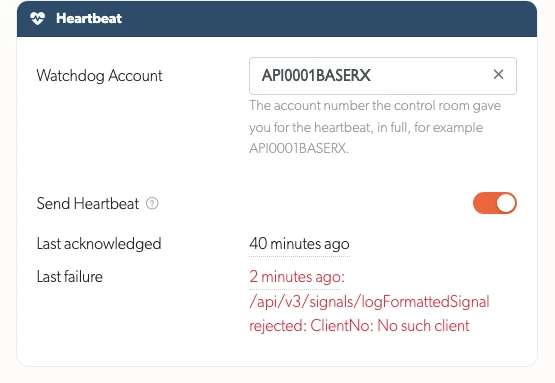
TetherX reports a rejected signal or a failed heartbeat to support with the reason Patriot gave, so raise a ticket if the settings look right and alarms are still missing.
Related Articles
- Patriot Systems Integration - Setting a site up, start here
- Control Room Software Integration - Immix, CONXTD and HikCentral
- Monitoring Station Operator Guide - Working alarms in the operator console
- Definitions - Event types and terminology