

Table of Contents
Exporting Camera Data and Snapshots
The Export menu on the Cameras page has two different exports:
| Choose | You receive |
|---|---|
| CSV or Excel | A spreadsheet of camera settings, status and configuration. |
| Camera Snapshots | A ZIP file containing one current JPEG still from each eligible camera. |
Set any filters first: both exports use the cameras currently shown in the list.
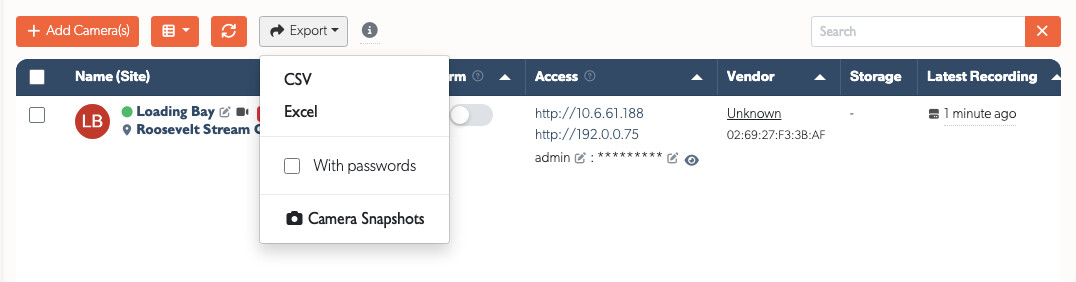
Export Camera Data
- Go to Admin → Cameras.
- Set the filters you need.
- Click Export, then choose CSV or Excel.
- We email the completed spreadsheet to the address on your account.
CSV is a plain-text spreadsheet that opens in Microsoft Excel, Google Sheets, LibreOffice Calc and Numbers. Excel (.xls) contains the same information with TetherX formatting.
Both include camera names, IP addresses, settings, status and configuration details. A large export may take a moment to prepare, so it arrives by email rather than downloading directly in the browser.
What Each Column Contains
Both formats carry the same 66 columns, in this order. A cell is empty where nothing has reported that value, and several columns come from the device behind the channel rather than from the camera itself.
| Column | Contains |
|---|---|
| State | Record, Monitor or Off. |
| TetherBox ID | The identifier of the TetherBox this camera records to. |
| Analytics Path | The URL path of the analytics stream, for example /stream2. Empty where the camera has answered no valid path. |
| Analytics State | The last result on the analytics stream, ok where it is healthy. Empty where nothing has reported it. |
| Audio Device | auto records the camera's own audio, none ignores audio, onboard records from the TetherBox audio input. |
| Recording Audio | Yes where the recording stream carries audio and the audio device is not none. |
| Cloud Package | The cloud subscription on this camera, written as a code such as 30D_2MP_V10. basic where nothing is subscribed. |
| Created At | When the camera was added. |
| Override Analytics URL | A full RTSP address that replaces the analytics path and port. Empty unless an administrator set one. |
| Device Id | The identifier of the device record behind this channel. |
| DVR | Yes where the device reported an NVR, DVR or hybrid device class, or reported more than one video input. |
| Event Trigger | Which side raises events: tetherbox_and_camera, camera_only or tetherbox_only. |
| Force TCP | Yes where RTSP is forced over TCP. |
| Height | The pixel height of the recording stream. |
| Height (Analytics Stream) | The pixel height of the analytics stream. |
| HTTP port | The camera's web port, 80 unless changed. |
| IP | The address used to reach the camera. A manual IP set by an administrator wins over the discovered one. |
| Latest Recording Date | The most recent recording we have seen from this camera. |
| ANPR | Yes where plate recognition is on for this camera. |
| MAC Address | The hardware address of the device behind the channel. |
| Name | The zone name the camera sits in. RenameMe where the camera has neither a zone nor a name. |
| Notes | Free text an administrator wrote on the camera. |
| Notify on These Analytics | The analytics categories and triggers you are notified about. |
| Always Notify on These Events | The triggers that notify you whatever the categories above say. |
| Always Ignore These Events | The triggers that never notify you. |
| Notify Offline | Yes where an offline camera raises an alert. |
| Notify Offline After | How many seconds offline before that alert is raised, 180 unless changed. |
| Online | Yes where the camera answered the last check. |
| ONVIF API State | The result of the last ONVIF call: ok, disabled, user_locked, unauthorised or no_credentials. |
| Password | [FILTERED] unless you ticked With passwords before taking the export. |
| Post Capture | Seconds recorded after an event, or auto, which keeps at least 15 seconds. |
| Pre Capture | Seconds recorded before an event, or auto, which keeps at least 15 seconds. |
| PTZ | Yes where the camera is set up for pan, tilt and zoom. |
| Override Record URL | A full RTSP address used for recording only. Empty unless an administrator set one. |
| Recording Mode | auto records continuously at a reduced frame rate and switches up on motion. continuous records everything and turns analytics off. |
| Recording Path | The URL path of the recording stream, where it differs from the analytics path. |
| Recording State | The last result on the recording stream, ok where it is healthy. |
| RTSP port | The port used for RTSP streaming, 554 unless changed. |
| Show ANPR on display | Yes where plates from this camera appear on a matrix display. |
| Snapshot Path | The HTTP path that returns a still image, for example /Streaming/channels/1/picture. |
| Subscription Details | The cloud settings behind the package, one setting: value per line, including retention days, image quality, timelapse and ANPR limits. |
| Main Stream | The encoder settings we push to the camera for the recording stream. Empty until they are edited. |
| Sub Stream | The same for the analytics stream. |
| H.265 | Yes where the recording stream is HEVC. |
| Subscribed By Company | The company billed for this camera's subscription. |
| Time Zone | The time zone the camera evaluates its schedule in, copied from its TetherBox. |
| Timeline ID | The identifier of the timeline the camera belongs to. |
| Transcode | Yes where the TetherBox converts the camera's video to H.264. |
| Transcode Quality | The quality of that conversion, 23.0 for very high quality and 30.0 by default. A higher figure makes smaller files. |
| URL auth | Yes where credentials are put in the RTSP address itself, which some Bosch cameras and Hikvision DVRs require. |
| Username | The username used to reach the camera. |
| Video Device | auto records video, none records audio only. |
| Width | The pixel width of the recording stream. |
| Width (Analytics Stream) | The pixel width of the analytics stream. |
| Zone ID | The identifier of the zone the camera sits in. |
| Timeline | The name of the timeline the camera belongs to. |
| Integrator | The company that owns the TetherBox. |
| Platform Subscription | Yes where the TetherBox holds a current Platform subscription. Empty where it does not. |
| Site | The site the camera is installed on. |
| Info | The site and zone together, as "Site - Zone". |
| Instalation Type | What the installer recorded at activation, such as "Brand New Installation" or "Replacing Existing TetherBox". |
| Suspected Failure | The disk the recorder behind this channel reported as faulty, and the state it reported. Empty for an IP camera, which has no disks. |
| Storage Capacity (GB) | The total size of the disks that recorder reported. |
| Storage Free (GB) | The free space it reported. |
| Storage Used (%) | How full it is. |
| Days of Footage | How far back its own footage goes, taken from its shortest channel. |
Tip: A camera recording to a DVR or NVR carries that recorder's storage figures, so several rows in the sheet can show the same disk.
With Passwords Option
By default, camera passwords are not included in CSV/Excel exports for security reasons. The password column will show [FILTERED].
To include actual passwords in your export:
- Click Export
- Tick the With passwords checkbox
- Select CSV or Excel
Warning: Only enable this option when you specifically need the passwords, and handle the exported file securely.
Download Current Camera Snapshots
This creates a ZIP file of current JPEG stills — one image per eligible camera. A snapshot is simply a still image captured at the time the export runs; there is no separate kind of “image” export.
- Set any filters on the Cameras page.
- Click Export → Camera Snapshots.
- Click Process Snapshots.
- We email a download link when the ZIP file is ready.
The files are named for their cameras. The download link expires after 7 days.
What is included
- Active cameras whose TetherBox is online.
- Cameras on an online TetherBox, whether or not it has a cloud subscription.
- Cameras matching the filters you set before starting the export.
If a camera cannot provide a snapshot, the completion email tells you why.
Useful for: a quick visual audit, installation handovers, and checking camera positioning and coverage.
Referenced in: