

Table of Contents
Alarm Signal Receiving
Use TetherX as an alarm receiving centre (ARC) for SIA DC-09 and Contact ID reports from IP communicators. When a message raises an alarm condition, TetherX opens an event on the camera watching the affected zone. Instead of leaving the alarm as a standalone log entry, TetherX presents it in context with the relevant video footage and time-aligned information from the site, such as licence plates, access control events and sensor activity. See What an Operator Sees When a Panic Arrives for the operator view.
Operators can review the incident alongside other events from the site's connected systems. TetherX also notifies the people on its notification list.
Compatible Alarm Panels
Use any alarm panel with an IP communicator that supports SIA DC-09 or Contact ID, including:
- Honeywell: Galaxy, LYNX, VISTA
- Texecom: via IP communicator, or serial integration
- DSC: PowerSeries, Impassa
- Bosch: Solution 2000/3000/6000
- Vanderbilt: Vigo/Vigor
- Inim Electronics
- Risco: LightSys
- Johnson Controls: C-addx Evolution/Networx/Patriot
- ADT: Pulse/Command
- Siemens: Sintony, Solution 844/862
- Napco: Gemini, Rapicon, StarLink
- Altronix: Hubway, ACM7000, ACM24V
- Other panels with SIA DC-09 or Contact ID support
Connection Methods
| Connection method | Use it when | Details |
|---|---|---|
| TCP Server | IP communicators (standard) | sia.timeline.is port 2200 |
| REST API | Your own platform forwarding SIA or Contact ID to TetherX | See API |
TCP Server
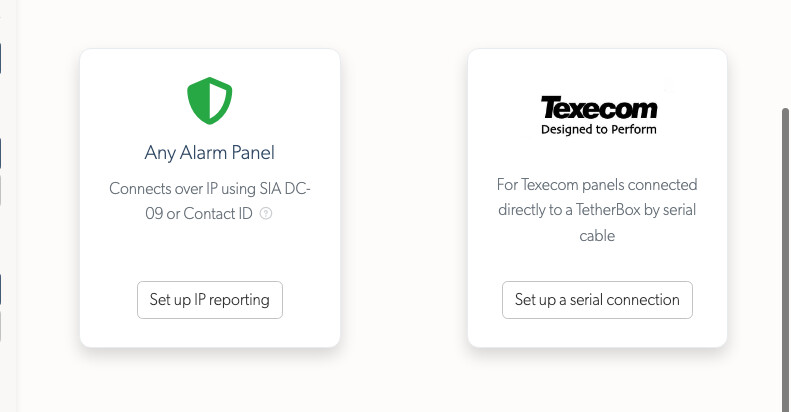
- Go to Alarms → Add Alarm and choose Any Alarm Panel.
Use this option for every panel reporting over IP, Texecom included. The Texecom card is only for a panel wired to a TetherBox by serial cable.
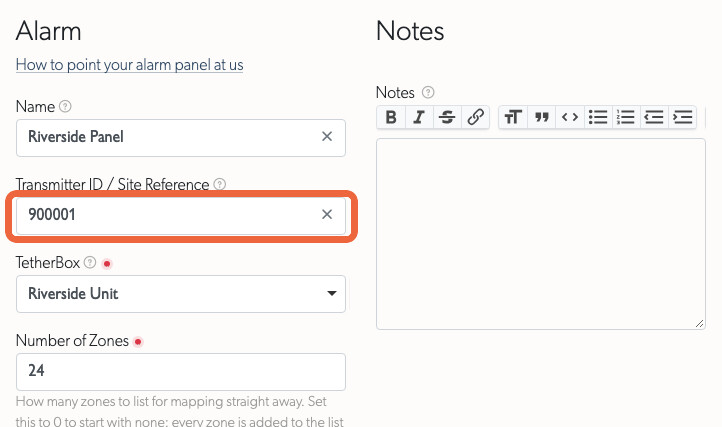
- Complete the panel details:
- Give the panel a Name that operators will recognise.
- Set Transmitter ID to the account number sent by the panel, for example
900001. TetherX uses this value to match incoming messages, so it must match the IP communicator's setting. - Set Number of Zones to the number of zones the panel reports. Leave it at
0to add each zone when it first reports a state. - Set Zone Numbering to match the numbers sent by the panel. Many panels start at 1001, making the sixth zone 1006, while panels reporting Contact ID may start at 1. Check the panel or its engineering manual.
The selected range determines the zones available for mapping. If the panel later reports a zone outside that range, TetherX adds it when the first message arrives.
- Configure the IP communicator:
- Host:
sia.timeline.is - Port:
2200 - Protocol: SIA DC-09 (SIA-DCS) or Contact ID (ADM-CID)
- Account/Site ID: Must match the Transmitter ID you set in TetherX
Tip: TCP reporting does not need an API token. TetherX uses the transmitter ID to route each alarm to the correct site.
REST API
Use the REST API when your platform or middleware receives SIA or Contact ID messages before forwarding them to TetherX.
- Create the Virtual alarm as described in TCP Server. Set its Transmitter ID to the account number your platform sends.
- Open your user profile and copy the Timeline API Token.
- Send the alarm message:
curl --request POST 'https://app.timeline.is/api/v3/alarms/sia_event?token=YOUR_TIMELINE_API_TOKEN' \
  --header 'Content-Type: application/json' \
  --data '{"alarm": {"sia_event": "[#900001|Nti22:02/ri01/PA1001|APanic Alarm]"}}'
This example sends a SIA message. You can also:
- Send the token as a top-level
tokenfield in the body. - Send a form-encoded request using
alarm[sia_event]as the field name.
| Response | Meaning |
|---|---|
200 |
The message was recorded |
400 |
The body could not be parsed as the content type it declares |
401 |
The Timeline API Token is not valid |
404 |
No Virtual alarm on a timeline the token reaches carries that transmitter ID |
422 |
The alarm message did not match the expected format. The body names the segment that was rejected |
429 |
More than 100 requests a minute arrived from this IP address |
A 422 names the segment and the shape expected for it:
{"data":{"errors":["The area segment riXX is not valid. Expected ri followed by a two-digit area, such as ri01."]}}
Warning: Use /api/v3, not the /api/v3p OAuth2 prefix. This endpoint requires a Timeline API Token and does not accept an OAuth2 access token or Authorization: Bearer header. See API for the full reference.
Report Panel Reachability
Have the panel or its receiver report its own connection state as online or offline, identified by its Transmitter ID. See Alarm panel online or offline for the request format, authentication, heartbeats and notification behaviour.
Map Each Panel Zone to a Camera Zone
An SIA or Contact ID message identifies the zone that fired. In the alarm's Zones table, use the Zone column to map each panel zone to the zone watched by a camera. A panel zone appears after the first message that names it.
- A panic on the till zone can open an event on the till camera, with its recording, thumbnail and location on the site map. TetherX also marks the camera's Related Zones as part of the incident.
- An unmapped panel zone still creates an event against the site, but without associated footage.
- Panel (set, unset, online or offline) is the panel itself, not one of its detectors. SIA, Texecom and panel-state reports each add a separate event. Map it to the zone watched by the keypad camera, so the event includes footage of the person at the keypad. Leave it unmapped to record the report against the site without footage.
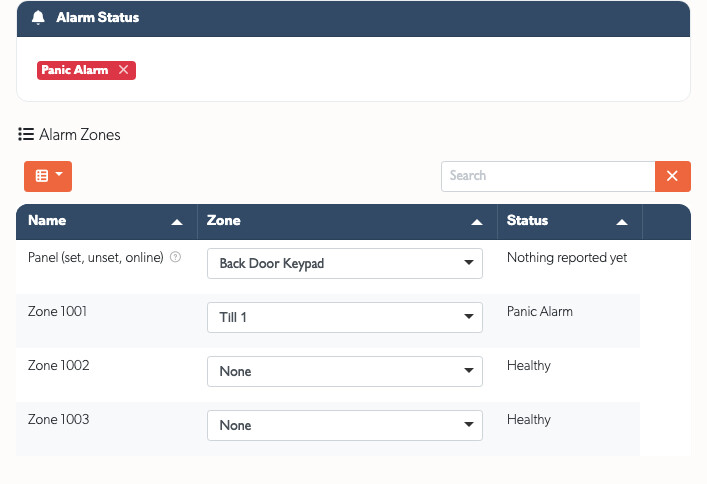
Alarm Status above the table shows the panel's last report.
- It clears when the panel sends a matching restore. An arming report has no restore, and a fault fixed on site may simply stop being reported.
- Anyone who can arm the panel can dismiss a status using the cross on its badge. The audit trail records who dismissed it and what the status said.
- Dismissing a status does not send a restore to a monitoring centre in your account's name.
Alarm Message Formats
TetherX accepts SIA DC-09 (opens in a new tab) and Contact ID reports from IP communicators. SIA DC-09 messages use human-readable ASCII and short codes.
SIA Decoding explains every message segment, using an example of each format. It also lists the codes that raise an alarm. This section covers the formats accepted by each connection method.
TCP Server Frames
The TCP server accepts complete DC-09 frames with either the "SIA-DCS" or "ADM-CID" identifier, including the CRC, sequence number and trailing timestamp.
FEC9003B"SIA-DCS"0001L0#777[#777|Nri0001/DL510]_12:29:37,01-17-2022
Set the account number in the IP communicator and TetherX processes the rest of the frame. DC-09 frames do not include a description, so TetherX shows the standard wording for the code.
Contact ID
Configure the IP communicator to report Contact ID over SIA DC-09 (ADM-CID) to sia.timeline.is on TCP port 2200. Set the account number to the Virtual alarm's Transmitter ID. TetherX reads the account, qualifier, event, partition and zone, then maps the event to the equivalent SIA code.
87CD0037"ADM-CID"9876R579BDFL789ABC#12345A[#12345A|1130 01 003]
The REST endpoint also accepts the inner Contact ID block: [#12345A|1130 01 003].
REST API Messages
The REST endpoint accepts an inner SIA block or Contact ID block and validates every segment:
[#900001|Nti22:02/ri01/PA1001|APanic Alarm]
A message that does not match either format receives a 422 response naming the invalid segment. Validation starts at the opening bracket, so TetherX ignores text after the closing bracket. A transmitter ID can contain only letters and digits. For example, SC01-900002 is rejected, so send the account number transmitted by the panel.
What an Operator Sees When a Panic Arrives
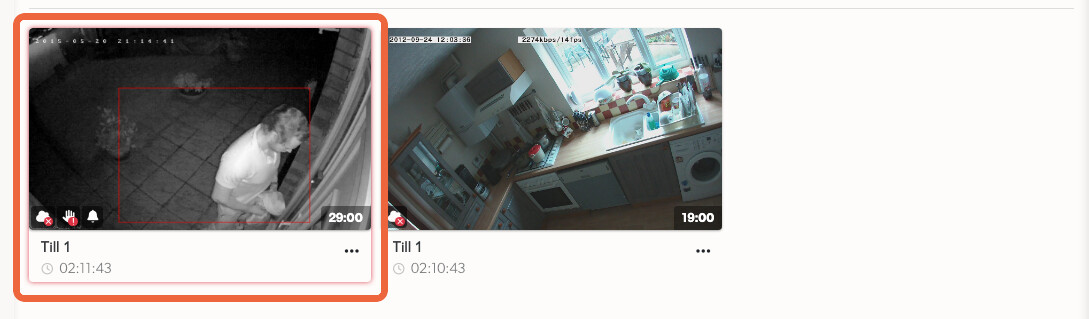
A panic on a mapped zone appears among the site's camera events, labelled with the panel signal. In list view, it sits in the rows an operator is already watching:
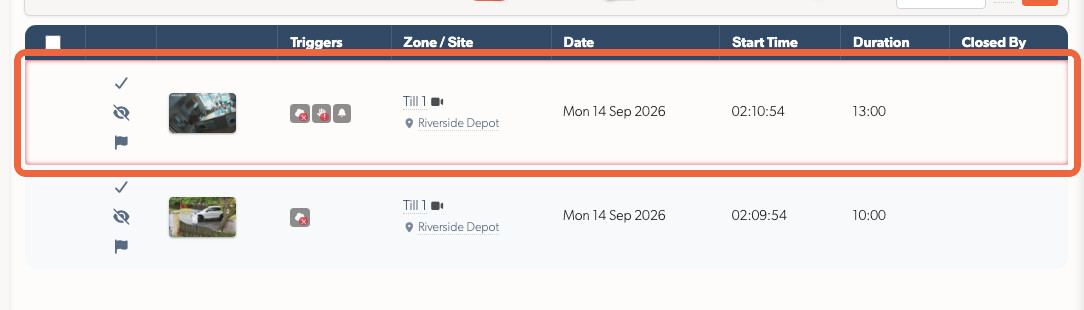
In thumbnail view, the same panic carries the panel's signal on its card, so the operator sees the footage and what the panel reported together:
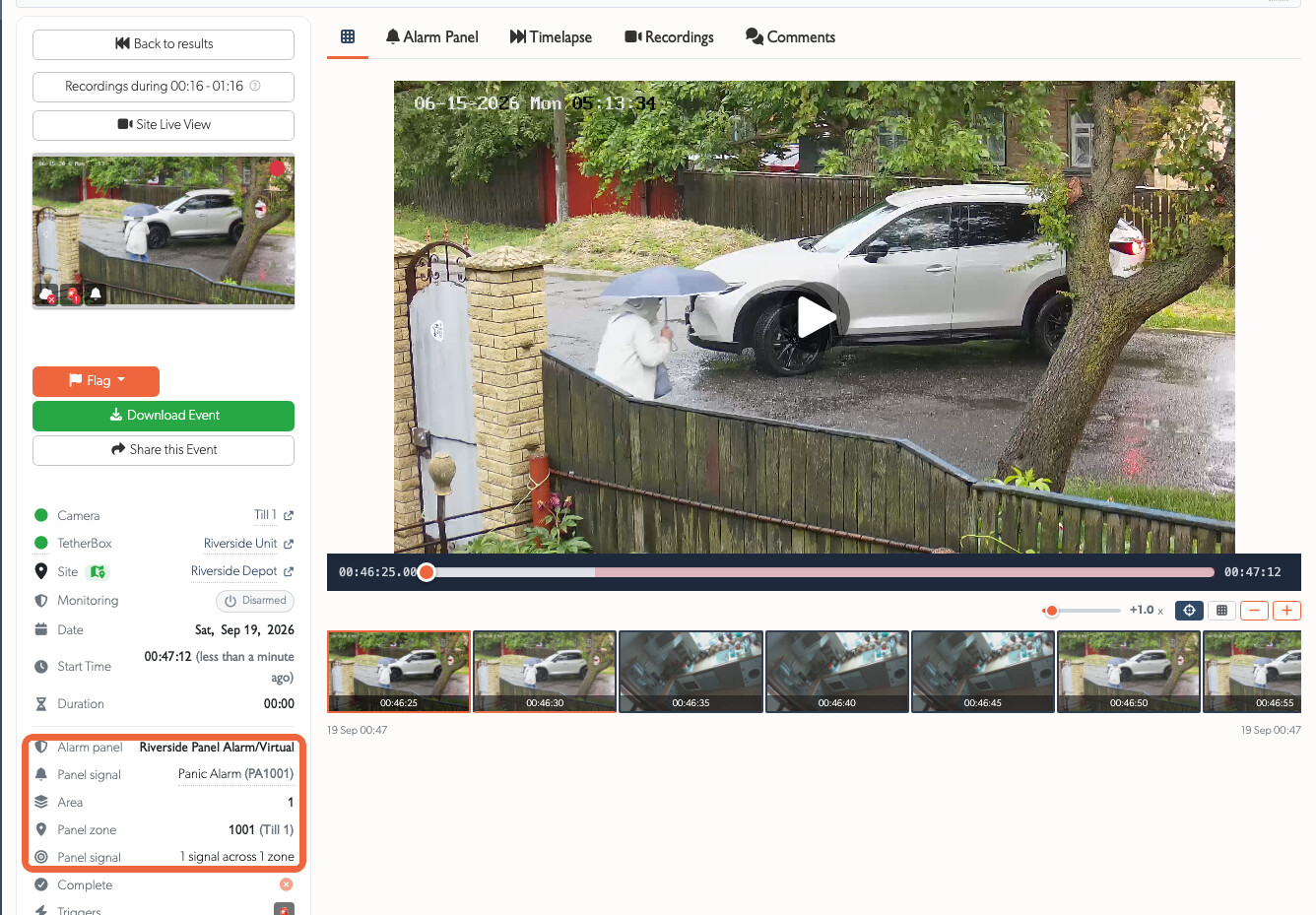
Open the event to see the reporting panel, signal, code, area and panel zone beside its mapped zone. Point to the signal to reveal the exact message for comparison with the panel log.
Click the panel name to open it, if you have permission.
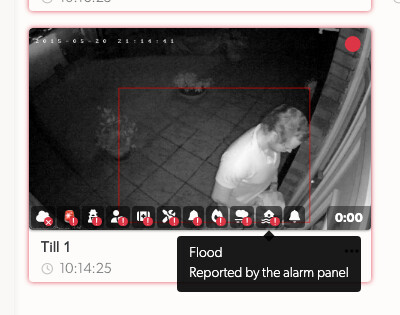
When the panel sends more than one alarm signal during the same incident, its events-index thumbnail keeps every relevant trigger icon. Point to an icon to read it, then open the event to read each signal with its panel zone and mapped camera zone:
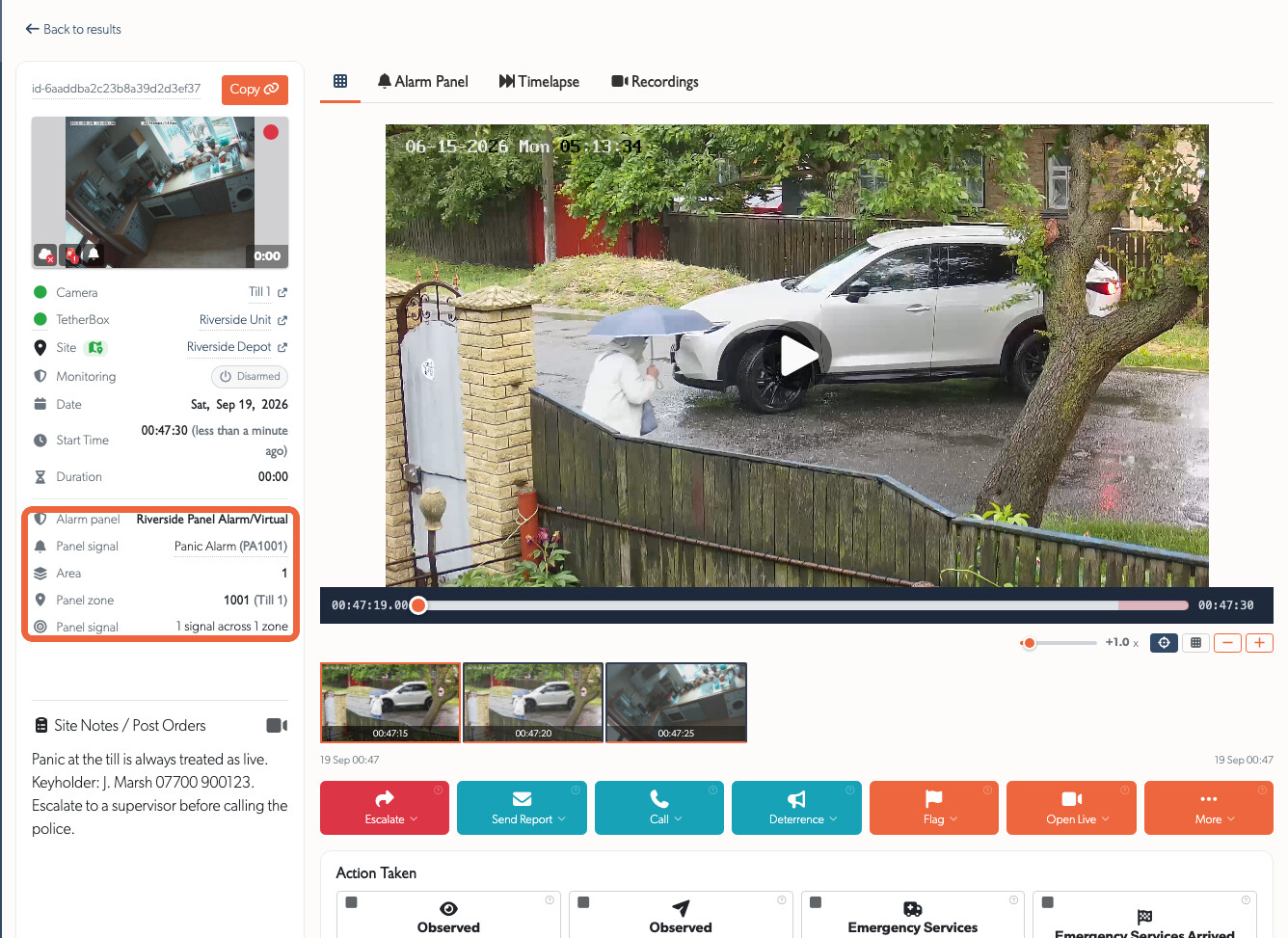
The operator console puts the panel details, footage, site notes and post orders and action toolbar in one view.
Several Messages, One Incident
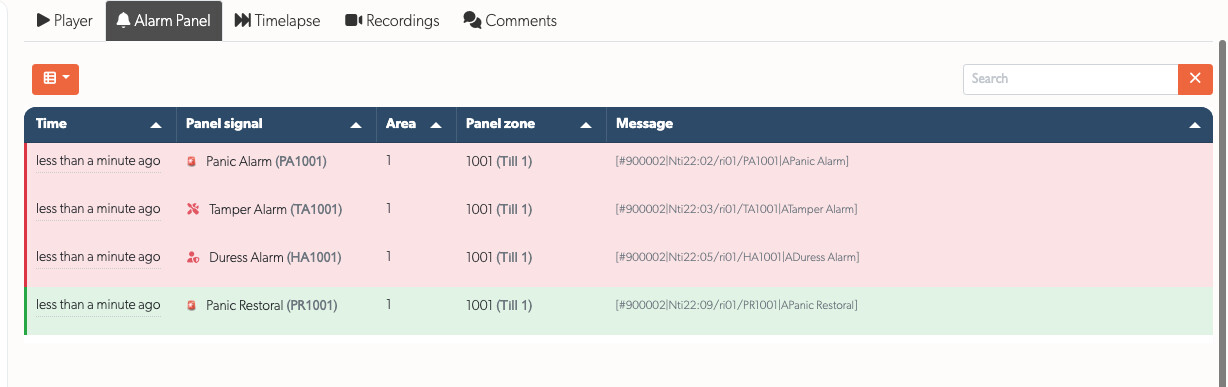
A panel rarely sends just one message. A panic, a tamper on the same zone and a duress code a minute later can all belong to one incident.
- TetherX attaches every message received while the event is open to that event.
- The details list shows the latest message.
- The Alarm Panel tab lists every message in arrival order with its original string.
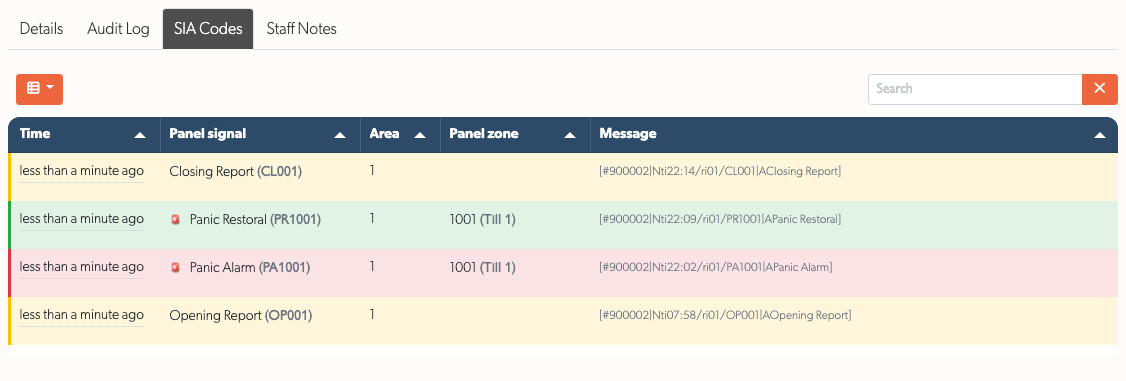
Messages that do not raise an alarm are still recorded. A restore closes a condition, while an opening or closing report describes the panel's state and files its own event against the camera mapped to the panel, so it appears in the panel's history rather than on the incident before it. View the complete message history in the SIA Codes tab on the alarm.
Each row is coloured by what the message did: red raised a condition, green cleared one, and amber set or unset the panel.
Related Articles
- Alarm Panel Integration - Choose the right integration path for your panel
- SIA Decoding - A message of each shape, decoded segment by segment
- SIA Event Codes - Complete reference of all supported event codes
- Related Zones - Which cameras a panel zone's alarm marks alongside the one that fired
- Notifications - Who is emailed, and how to pause notifications
- API - REST API reference and authentication
Referenced in: